![localgov-logo-white.png]](https://service.localgov.org/hs-fs/hubfs/localgov-logo-white.png?height=50&name=localgov-logo-white.png)
Important: Your STR Permit Application must be submitted and approved before you can submit your Business License Application.
STR Registration Procedure
1. Log in to Localgov
-
-
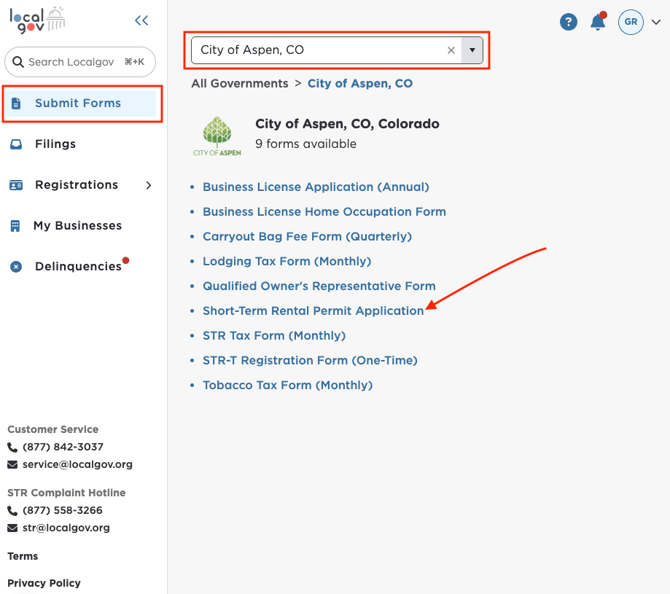
Log in to your Localgov account and navigate to the Submit Forms page.
- Search for or select City of Aspen, CO from the drop-down menu.
-
-
-
You will then see the list of available forms for Aspen. Select Short-Term Rental Permit Application.
-
2. Select Application Type
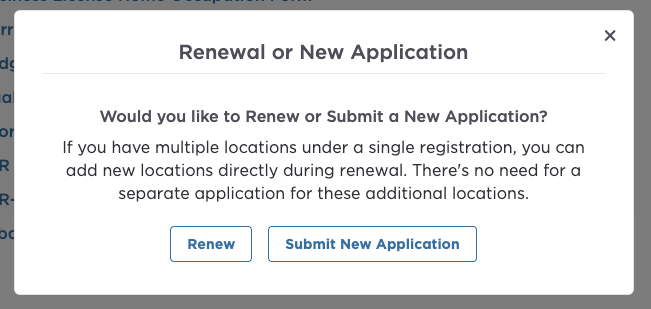
A prompt will appear asking whether you want to submit a:
-
- Renewal Application
- New Application
Renewal Application
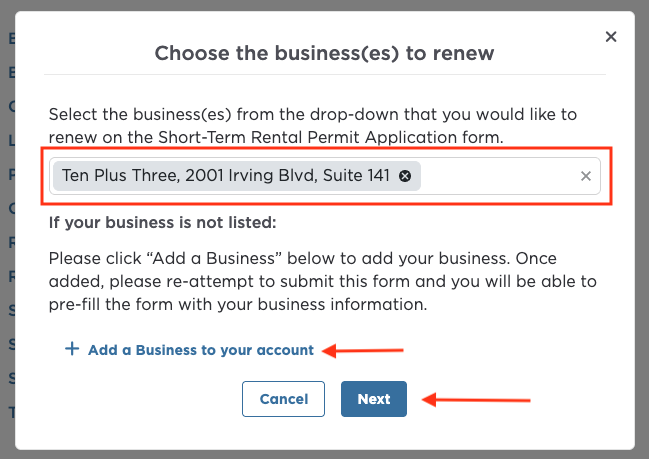
If you select Renewal, a dialog box will appear prompting you to search for or select your property from the drop-down list. Only active or expired Aspen registrations eligible for renewal will appear.
Please note that renewal applications are only accepted between November 15 and January 14 of each year. If a renewal is not submitted within this period, your STR Permit will be revoked and you will be required to submit a New Application if you wish to continue operations.
- Search and Select your property/properties
- Click Next to begin the application
- If your business is not listed, click "Add a Business to your account" to add it and select it for your application.
📲 If you can't find your property, please contact Localgov Customer Service at (877) 842-3037 or service@localgov.org
New Application
If you select New Application, a dialog box will appear prompting you to search for or select your property. Only newly identified properties subject to registration in Aspen will appear.
-
- Select your property/properties
- Click Next to begin the application
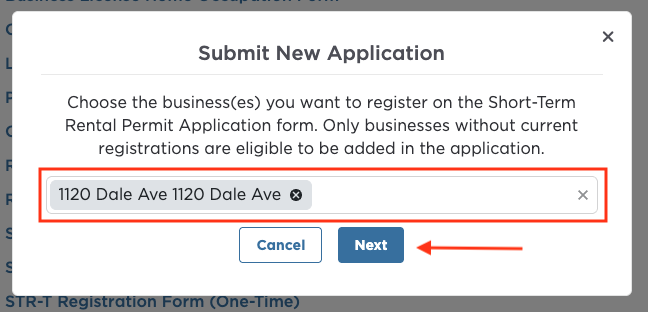
- If your property is not listed, click “I can’t find my business” to proceed with completing your application manually.

3. Complete the Short-Term Rental Permit Application Form
-
-
The first page contains important instructions. Please review them carefully before proceeding.
-
Complete all required fields and upload the necessary documents on each page of the application.
-
Click Next to continue through the form.
-
🔖 Need to finish later? No problem.
Click Save and Close at the bottom of the form to save your application as a draft.
To resume your application:
- Go to the Applications page
- Locate your draft application
- Click the Action button
- Select Resume
4. Review Your Application
-
-
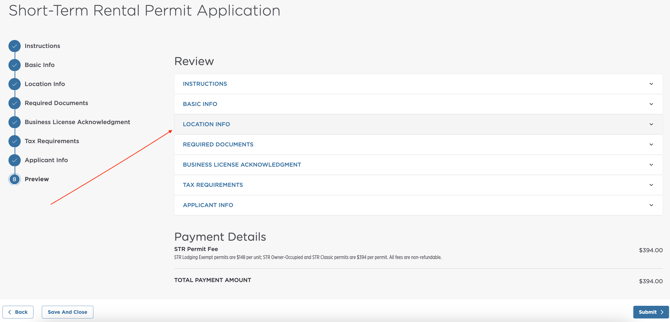
On the Preview page, review all information entered before submitting.
-
You may expand each section and click Edit if changes are needed.
-
❗Once you proceed to the payment page, you will no longer be able to edit your application. If you need assistance, contact Localgov Customer Service.
5. Submit and Pay
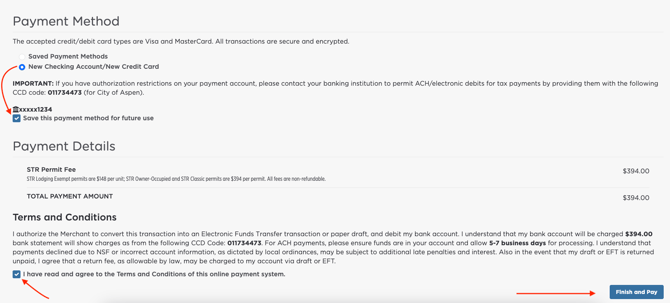
Once all information and fees are confirmed, click Submit. You will be redirected to the File and Pay page to complete your STR Permit payment.
You need to:
- Add a new checking account or credit/debit card
- Save your payment method for future use
-
Complete payment:
- Agree to the terms and conditions
- Click Finish and Pay
You will then be redirected to a confirmation page. A PDF invoice will also be emailed to the email address associated with your account.
💰Continue a Payment Later
If you exit before submitting payment:
-
Go to the Applications page
-
Find the application with the status Submission Payment Required
-
Click the Action button or the three dots
-
Select Pay Now
6. Wait for Approval
Applications are typically reviewed within 15 days of the submission date.
-
-
You will receive an email confirmation after submitting your application. The email will include information about what to expect during the review process and any next steps that may be required.
-
The City may contact you if additional information or supporting documents are needed to process your application.
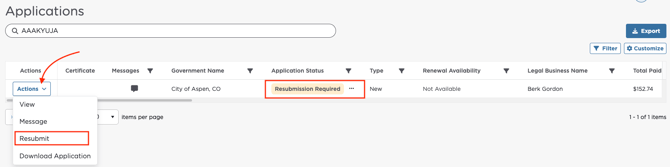
- If revisions are required, you may be asked to update and resubmit your application for further review. You will receive a notification via email or in-app with detailed instructions.
-
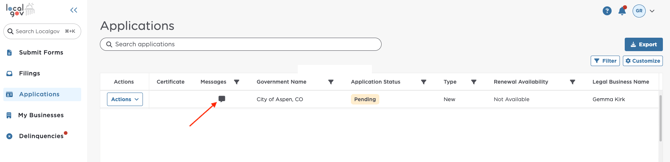
🗨️ You can also use the messaging feature to communicate directly with the City regarding your application status.
7. Download Your Short-Term Rental Permit
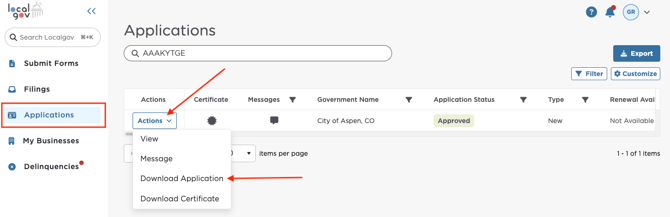
Once your application has been Approved, you can download your Short-Term Rental Permit Certificate.
- Navigate to the Applications page.
- Locate your approved application by checking the Application Status or search it with the Reference ID.
- Click the Certificate icon or the Action button and select Download Certificate.
- Allow a few moments for the certificate to download to your computer.
- Once the download is complete, you can access the certificate from your browser's download history or your computer's Downloads folder.
Business License Procedure
Once your STR Permit Application has been approved, you may proceed with your Business License Application.
1. Submit the Business License Application
-
-
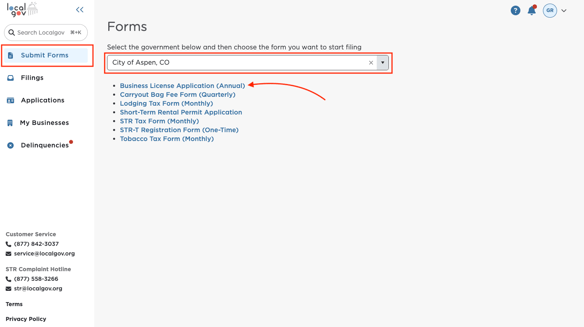
Follow the same steps outlined above, but select Business License Application from the list of forms instead.
-
Complete the application, upload any required documents, and submit payment.
-
2. Wait for Approval
Once submitted, your application will be reviewed by the City.
-
-
You will receive an email and in-app notification once your Business License Application has been approved.
-
3: Download Your Business License Certificate
After your application is approved, you can download your Business License Certificate.
🗒️ Monthly STR Tax Filing Requirement
After your Business License has been approved, you will be required to submit your monthly Short-Term Rental Tax filings through Localgov. Click here to learn how to successfully pre-fill, submit, and pay your Short-Term Rental Tax filing form.
❓If you need further assistance or have any questions, please contact Localgov Customer Service at (877) 842-3037 or email service@localgov.org.